Single-image “face swap” workflows almost always fall apart by shot four. Push a single portrait reference across a twelve-frame e-commerce lookbook or brand campaign, and the model starts guessing everything the source photo never showed: side-profile jawlines, hairline transitions behind the ear, collar drape under directional strobe light, and how skin tone responds to warm outdoor bounce versus cool studio fill. Modern 10-to-16 slot multi-reference architectures solve that structural blind spot without forcing your team into multi-hour dataset curation or fragile LoRA training runs. When you allocate reference slots deliberately across identity, wardrobe, product SKUs, and lighting mood, a single pay-as-you-go session produces a cohesive twelve-shot commercial sequence in under an hour.
Playbook Summary · 12-Shot Consistency
- 01The 4-Bucket Slot Budget: Dedicate 45% of your reference slots (Slots 1–4) to neutral-light facial geometry, 25% (Slots 5–7) to garment flatlays and fabric weave, 15% (Slots 8–10) to handheld product SKUs and brand marks, and 15% (Slots 11–16) to key-light and framing anchors.
- 0212-Shot Campaign Cost Math: Factoring in a realistic 20% retake buffer (15 total renders at $0.01/cr on CreoArt’s base $5 / 500-credit pack), a 1K twelve-shot lookbook costs $1.05 on Nano Banana 2.1, $1.50 on Seedream 5.5, and $1.50 to $5.25 on GPT Image 2.6 Flare (Medium to High quality)—dropping an additional 9% on the $59 / 6,500-credit bundle ($0.0091/cr).
- 03Engine Selection by Brief: Route fast-iteration lookbooks to Nano Banana 2.1 (14 slots), complex multi-prop commercial scenes to GPT Image 2.6 Flare (16 slots), and warm fashion or founder portraits requiring natural fabric drape to Seedream 5.5 (10 slots).
- 04Lighting Hygiene Beats Slot Count: Four clean, front-lit studio portraits on neutral gray outperform twelve lifestyle selfies contaminated by sunset orange, neon club spill, or wide-angle lens distortion.
Why Single-Reference Face Locks Drift After Three Shots
A single reference image forces an image model to extrapolate three-dimensional anatomy from one flat camera angle. In shot one—usually a straightforward medium close-up—the generator copies the source face faithfully. By shot three or four, once you ask for a three-quarter walking turn, an over-the-shoulder product interaction, or a seated editorial crop, the model lacks ground-truth geometry for the unseen side of the face. It fills the gap using statistical averages from its training data, subtly widening the nasal bridge, shifting the hairline temple peak, or aging the subject by five years.
Three specific failure modes compound that drift across a campaign:
- Prompt-Bleed Into Facial Structure: Descriptive scene tokens (“rugged alpine expedition,” “high-fashion Milan runway,” “late-night Tokyo street”) leak directly into facial proportions when only one identity anchor holds the line. High-fashion prompts sharpen cheekbones; rugged outdoor prompts add weathered skin texture that belongs to a different person.
- Lighting Contamination: If your single reference photo was shot under warm tungsten restaurant light or golden-hour sun, that color cast bakes into the model’s latent representation of the subject’s skin. Place that character inside a cool north-facing architectural studio, and the skin looks muddy or artificially bronzed.
- Focal-Length Distortion: A smartphone selfie taken at 24mm equivalent enlarges the nose and narrows the ears compared to an 85mm commercial portrait lens. Mixing a wide-angle reference with an 85mm editorial prompt creates uncanny facial proportions that art directors immediately reject.
Historically, commercial teams solved this by curating 25 to 40 captioned images and training a custom LoRA—burning half a production day before generating a single deliverable frame. Worse, a baked LoRA locks in hair length, facial hair, and styling biases that fight you when the client changes creative direction mid-sprint. Multi-reference conditioning with 10 to 16 simultaneous image slots replaces that brittle training step for roughly 90% of commercial lookbooks, giving you deterministic control you can edit slot-by-slot between shots.
The 4-Bucket Reference Slot Architecture (10 to 16 Slots)
Throwing fourteen random photos into a multi-reference prompt creates attention dilution: the model averages conflicting cues and loses sharpness on the face. Instead, treat your reference tray like a physical studio call sheet divided into four weighted buckets.
Bucket 1: Identity Anchors (Slots 1–4 · 45% Priority)
These four slots never change across all twelve shots of your campaign. Every frame must show the exact same subject under flat, diffused, color-neutral lighting (5200K–5600K) against a mid-gray or off-white background:
- Slot 1 (Front Neutral Portrait): Straight-on eye-level headshot, relaxed expression, ears and hairline fully visible.
- Slot 2 (Three-Quarter Angle Turn): 45-degree head turn showing cheekbone projection, brow ridge depth, and chin-to-neck transition.
- Slot 3 (Side Profile Silhouette): 90-degree profile establishing nasal bridge slope, jawline angle, and ear placement.
- Slot 4 (Tight Facial Close-Up): Macro framing from brow to chin capturing iris color, natural skin pores, freckles, or beauty marks.
Bucket 2: Wardrobe & Fabric (Slots 5–7 · 25% Priority)
Text prompts alone (“camel wool blazer”) produce generic tailoring that mutates seam lines from frame to frame. Anchor the physical garment with three concrete visuals:
- Slot 5 (Hero Garment Flatlay or Ghost Mannequin): Full front view showing lapel width, button stance, pocket placement, and hem length.
- Slot 6 (Textile Weave Close-Up): Tight macro shot of the fabric grain—herringbone wool, brushed cotton twill, ribbed knit, or raw silk—so the renderer preserves surface texture under both hard and soft light.
- Slot 7 (Signature Footwear or Eyewear): Dedicated reference for structured accessories (acetate frames, leather loafers, minimalist watch) that otherwise morph across wide and medium crops.
Bucket 3: Props & Brand SKU (Slots 8–10 · 15% Priority)
For e-commerce and CPG campaigns, the product cannot drift any more than the talent’s face:
- Slot 8 (Primary Product SKU): Clean packshot of the bottle, device, or packaging at a three-quarter angle.
- Slot 9 (Secondary Handheld Tool or Bag): Any companion object the talent holds or wears over the shoulder.
- Slot 10 (Clean Brand Logo or Label Card): High-contrast graphic reference so embossed hardware, woven labels, or printed typography stay legible when the talent interacts with the item.
Bucket 4: Light & Framing Mood (Slots 11–16 · 15% Priority)
Use the remaining slots to lock photographic execution rather than character traits:
- Slots 11–12 (Key-Light & Shadow Falloff Reference): An editorial tear-sheet showing exact contrast ratio, rim-light separation, and specular highlight roll-off.
- Slots 13–14 (Color Palette Swatch or Set Environment): Architectural material reference or muted color grading guide.
- Slots 15–16 (Lens Framing Composition): Pose and negative-space blueprint for full-body versus medium-crop shots. When working inside Seedream 5.5’s 10-slot ceiling, trim Bucket 4 first and fold lighting direction into your text prompt while keeping Slots 1–4 intact.
Comparing the Three Multi-Reference Engines & 12-Shot Campaign Math
CreoArt houses 45 live AI models under a single pay-as-you-go credit wallet where credits never expire—starting with 10 free watermark-free welcome credits on signup (plus 3 free daily watermarked FLUX.2 Klein 4B trials for quick composition tests), $5 for 500 credits ($0.01/cr), $19 for 2,000 credits ($0.0095/cr), $59 for 6,500 credits ($0.0091/cr), or any custom top-up from $5 to $500 at 100 credits per dollar (Pricing). Because all three flagship multi-reference engines draw from that same wallet, you can match the model to the exact complexity of each shot rather than paying for maximum slot capacity on simple frames.
| Engine & Route | Max Ref Slots | 1K Credit Cost | 2K Credit Cost | 12-Shot Lookbook Cost (15 Renders Incl. 20% Buffer @ $0.01/cr) | Best Production Role |
|---|---|---|---|---|---|
| GPT Image 2.6 Flare | 16 slots | 5 cr Low ($0.05) · 10 cr Med ($0.10) · 35 cr High ($0.35) | 10 cr Low ($0.10) · 20 cr Med ($0.20) · 70 cr High ($0.70) | $0.75 (1K Low) · $1.50 (1K Med) · $5.25 (1K High) · $10.50 (2K High) | Complex commercial scenes combining 4-angle face + multi-piece wardrobe + brand SKU + lighting anchors in one pass (16 aspect ratios). |
| Nano Banana 2.1 | 14 slots | 7 cr ($0.07) | 11 cr ($0.11) | $1.05 (1K) · $1.65 (2K) | High-speed production workhorse for 12-shot lookbooks, rapid pose exploration, and multi-angle e-commerce batches (15 aspect ratios). |
| Seedream 5.5 | 10 slots | 10 cr ($0.10) | 14 cr ($0.14) | $1.50 (1K) · $2.10 (2K) | Editorial fashion campaigns, founder portraits, warm skin-tone stability, and natural textile drape (10 aspect ratios). |
In live studio production, mixing engines across a single campaign sheet delivers the highest margin and visual consistency:
- Explore and block in Nano Banana 2.1: Run your initial 12-frame composition grid at 1K (7 credits per frame) using up to 14 slots to validate poses, focal lengths, and crop ratios across your storyboard.
- Lock hero SKU + wardrobe masters in GPT Image 2.6 Flare: For the 3 or 4 hero campaign frames where the model holds a branded product, wears layered outerwear, and requires strict lighting direction across all 16 slots, switch to GPT Image 2.6 Flare at Medium (10 cr) or High (35 cr) quality—or jump straight to 4K (16/32/112 cr) for print deliverables.
- Finish warm editorial and lookbook sequences in Seedream 5.5: Once your core character sheet and key looks are established, drop to 10 focused reference slots in Seedream 5.5 (10 cr at 1K, 14 cr at 2K) for warm daylight lifestyle frames where organic fabric fold and subtle skin-tone transitions matter most.
Visual Proof: Same Identity Anchor Across Studio, Tailoring & Daylight
Moving a character from a crisp corporate headshot into a tailored studio lookbook and then out into warm resort daylight is where weak reference pipelines break down. Notice how the subject below holds structural continuity across three completely different lighting rigs and styling setups:
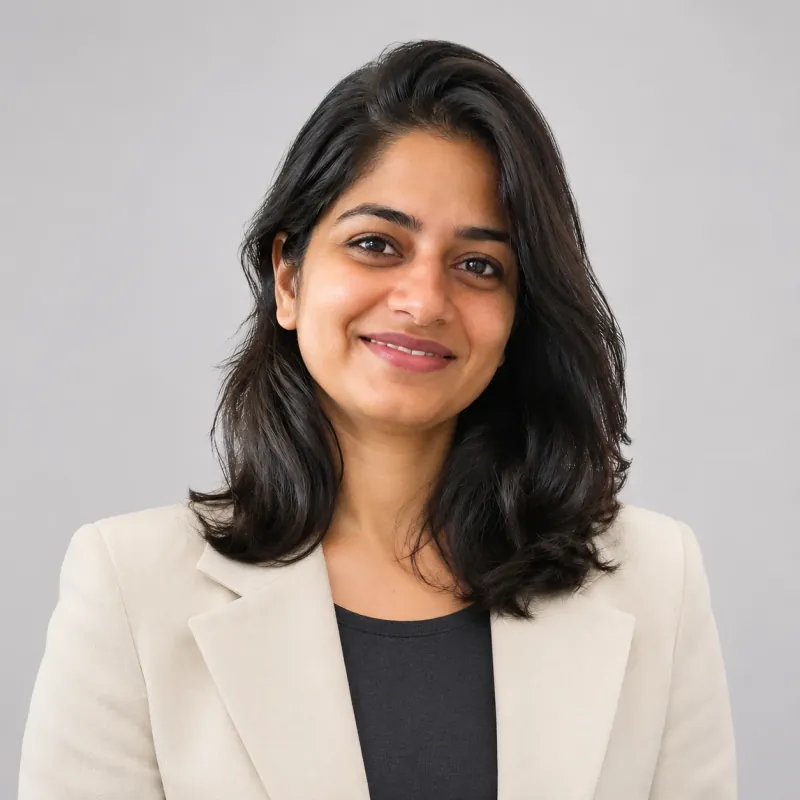
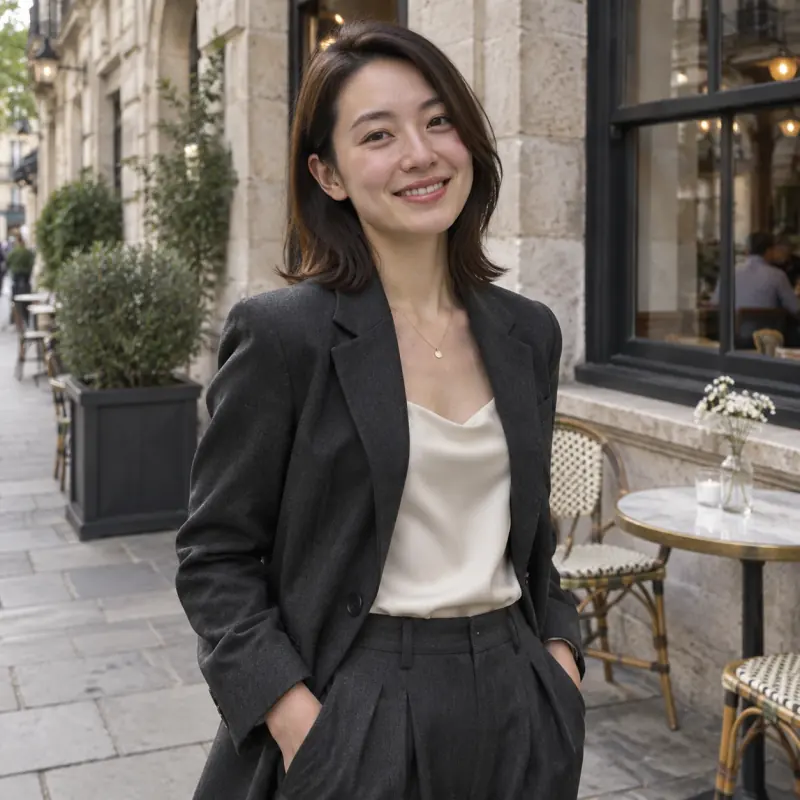

Three anatomical anchors carry continuity across those three environments without triggering the uncanny “pasted face” look:
- Zygomatic Bone Structure & Brow-to-Nose Ratio: Because Slots 1–4 define the cheek highlight ridge and interpupillary spacing from multiple angles, directional key light in the studio blazer frame casts accurate micro-shadows beneath the cheekbones rather than flattening the mid-face.
- Hairline Geometry & Part Line: Keeping the hairline exposed in the neutral identity sheet prevents the generator from inventing a different forehead height or temple recession when wind or overhead sunlight hits the hair outdoors.
- Zero Conflicting Color Casts in Reference Slots: None of the identity anchors carry heavy Instagram-style LUTs or colored gel spill. That allows the model to calculate realistic warm daylight bounce on the skin in frame three while keeping melanin density and undertone identical to frame one.
The 12-Shot Production Sequence (Step-by-Step)
Phase 1: Build the Neutral 4-Angle Identity Sheet
Start by assembling four clean base portraits of your talent or virtual brand ambassador. If you are creating a net-new brand character from scratch—or standardizing uneven client snapshots—generate a clean studio baseline first in the AI Headshot Generator, or refine isolated hair geometry in AI Hairstyle before locking your master sheet. Strip out sunglasses, heavy hats, harsh rim gels, and wide-angle distortion. Every pixel in Slots 1–4 should represent neutral studio truth.
Phase 2: Lock Wardrobe & SKU Slots Before Touching Locations
Do not test locations, wardrobe, and camera angles simultaneously. Load Slots 1–4 (Identity) plus Slots 5–7 (Wardrobe) inside Image-to-Image or AI Clothes Changer, and run two test frames against a plain studio backdrop first. Explicitly map each reference index in your prompt text (“subject from Reference Images 1–4 wearing the structured camel blazer from Reference Image 5 with the herringbone weave from Reference Image 6”). Once garment drape and button alignment lock cleanly, add Slots 8–10 for your product SKU.
Phase 3: Shoot the 12-Shot Matrix (4 Framing Scales × 3 Lighting Moods)
With Slots 1–10 frozen, build a disciplined 12-shot production grid so every deliverable serves a clear marketing placement:
- Shots 1–4 (Hero E-Commerce & PDP Crops — 4:5 Aspect Ratio): Full-length standing look, three-quarter walking stride, seated studio pose, and waist-up product interaction under clean commercial softbox lighting.
- Shots 5–8 (Editorial Campaign & Lookbook — 3:4 or 2:3 Aspect Ratio): Architectural daylight frames swapping only Slots 11–14 (lighting and framing mood) while keeping Identity and Wardrobe untouched.
- Shots 9–12 (Social, Banner & Detail Crops — 1:1 and 16:9 Aspect Ratios): Tight 85mm beauty/eyewear close-up, over-the-shoulder SKU detail, and wide environmental negative-space banner crops for web headers.
Phase 4: Surgical Post-Fix Instead of Full Rerolls
Never burn credits regenerating an entire twelve-slot composition just because one pinky finger bent awkwardly around a coffee cup or a collar tip folded asymmetrically. Send the near-final frame directly to the Local Image Editor, paint a tight brush mask over the flawed hand, eyewear hinge, or watch dial, and regenerate only that masked region while keeping the surrounding face and lighting untouched.
For final delivery, open your approved 12-shot set in the Photo Editor—CreoArt’s free client-side WebGPU editor—to apply non-destructive exposure matching, subtle film grain unification, PSD layer adjustments, and batch aspect-ratio exports directly in your browser with zero server upload overhead.
Two Production-Ready Multi-Reference Prompt Templates
Copy and adapt these exact structures when wiring your reference slots inside CreoArt. Naming the slot numbers directly inside the prompt prevents the model from confusing fabric swatches with background textures.
Editorial commercial fashion photograph of the exact person from Reference Images 1, 2, 3, and 4, preserving identical facial bone structure, brow-to-nose proportions, hairline geometry, and natural skin texture. The subject is wearing the structured double-breasted wool coat from Reference Image 5 featuring the exact textile weave from Reference Image 6 and the leather loafers from Reference Image 7. In their right hand, they hold the matte glass skincare bottle from Reference Image 8 with the exact label typography from Reference Image 10 clearly legible. Three-quarter standing stride inside a minimalist limestone gallery matching the architectural palette of Reference Image 13, lit by soft directional north-facing window key light and gentle floor bounce matching Reference Image 11. Shot on medium-format camera with an 85mm f/2.2 lens, natural depth of field, authentic skin pores with zero plastic smoothing, crisp fabric seam fidelity, true-to-life color rendition.
Preserve the exact facial identity, jawline, hairline, skin undertone, and calm confident expression of the subject in Reference Images 1 through 4. Replace the current outfit with the tailored linen resort shirt and pleated trousers shown in Reference Images 5 and 6, maintaining natural fabric drape, realistic collar fold, and subtle weave texture under warm late-afternoon coastal daylight matching Reference Image 9. Medium three-quarter portrait framed from mid-thigh up on a 70mm commercial lens at f/2.8, soft warm specular highlights on cheekbones, natural shadow falloff across the torso, anatomically accurate hands resting casually near the pocket, authentic editorial photography with zero artificial airbrushing.
Even 16 reference slots cannot defy missing spatial data. Multi-reference prompting still hits predictable walls in three scenarios: extreme 180-degree rear or overhead views where zero facial landmarks remain visible to anchor identity; micro-typography embroidered on curved, moving sleeves smaller than 20 pixels high; and 60-shot serialized graphic novels requiring pixel-identical asymmetrical tattoos across extreme dynamic foreshortening. When a brief crosses those boundaries, generate the base pose first, composite crisp vector graphics or clean plates inside the Photo Editor, or repair micro-details with targeted masks in the Local Image Editor rather than brute-forcing dozens of full-frame rerolls.
FAQ
Frequently Asked Questions
How many identity photos should I upload before slot dilution hurts likeness?
Four neutral-light angles (front, three-quarter, side profile, and tight facial close-up) hit the mathematical sweet spot. Uploading eight or ten redundant selfies taken at similar angles dilutes attention weights, leaves too few slots for wardrobe and product SKUs, and introduces conflicting focal-length distortion that softens facial sharpness.
Do I still need to train a custom LoRA for a 12-shot brand lookbook?
No. For 8-to-24 shot e-commerce lookbooks, seasonal campaigns, and executive portrait series, 10-to-16 slot multi-reference conditioning in GPT Image 2.6 Flare, Nano Banana 2.1, or Seedream 5.5 matches LoRA facial consistency while saving hours of dataset captioning—and lets you swap outfits or props mid-shoot without retraining weights.
What is the exact USD cost to produce a 12-shot campaign on CreoArt?
Including a realistic 20% retake buffer (15 total generations), a 1K twelve-shot campaign costs $1.05 on Nano Banana 2.1 (7 cr/image), $1.50 on Seedream 5.5 (10 cr/image), or $1.50 to $5.25 on GPT Image 2.6 Flare (10 cr Medium / 35 cr High) at CreoArt’s $5 / 500-credit entry rate ($0.01/cr). Buying the $59 / 6,500-credit pack drops your effective rate to $0.0091/cr, trimming a 15-render Nano Banana 2.1 batch to $0.96.
How do I keep clothing weave and tailoring consistent when moving from studio to outdoor light?
Dedicate Slot 5 to a flat-lit ghost mannequin or flatlay shot of the full garment and Slot 6 to a macro close-up of the fabric weave, then reference both slot numbers explicitly in your prompt. Avoid using wardrobe reference photos shot under colored club lights or harsh noon shadows, which trick the model into baking shadow shapes into the fabric pattern.
Are real model or founder face uploads kept private and removable after the shoot?
Yes. Every reference upload and generated output inside CreoArt is stored in private Cloudflare R2 storage with zero public community gallery exposure, enforced 30-day maximum automatic retention, and instant one-click permanent file deletion inside your Library whenever a client NDA or shoot wraps.
Put This Into Practice
Run the exact models tested here — without a monthly lock-in
Try 3 free daily FLUX.2 images with no account, or top up a never-expiring $5 pack (500 credits) to test all 44 image and video models privately.
Private R2 storage · Zero public gallery·100% auto-refund on upstream failures