
AI Image Tools & Free Local Browser Photo Studio
Stop bouncing across ad-filled single-purpose websites — unite 16 specialized AI image tools + a 100% free local WebGPU PSD editor in one private studio from 4–12 credits per run, with zero subscriptions.
AI Image Generator
3 free daily FLUX.2 images with no login, plus 20+ flagship models.
Styles & Templates
Commercial packshot presets, 3D collectibles, portraits & styles.
Photo & PSD Editor
100% free local WebGPU PSD & layer editor with zero uploads.
Online Photoshop
Browser PSD curves, blend modes & masks with zero ads or monthly fee.
PSD Viewer & to PNG
Inspect .PSD / .PSB layers and export PNG/WebP locally in browser.
Image to Prompt
Reverse-engineer any reference image into structured prompts (3 free/day).
Product Photo Prompts
6D studio lighting, surface & lens builder for Amazon/Shopify shots.
PhotoCraft Online Guide
Run open-source Rust + WebGPU ArtCraft PhotoCraft in your browser.
Free Photoshop Alternatives
2026 comparison of CreoArt WebGPU, Photopea, GIMP, Krita & Canva.
Best AI Photo Editors
Subscription editors vs pay-as-you-go inpainting, cutout & 4K upscale.
Open PSD Online Free
Inspect PSD layers and export transparent PNGs locally in browser.
AI to PSD Layer Workflow
Pair AI generations with local PSD curves, masks & crisp typography.
Image to Image
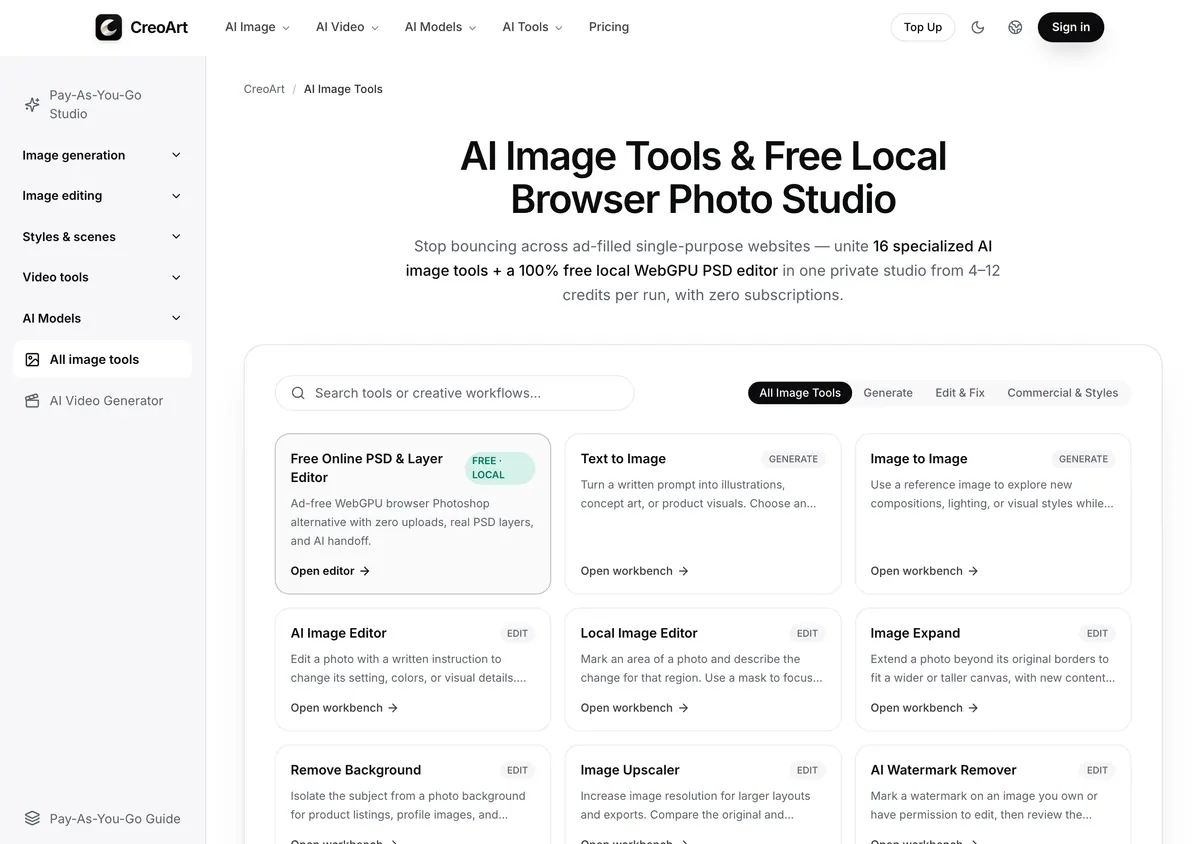
Use a reference image to explore new compositions, lighting, or visual styles while guiding the result with a written prompt.
Local Image Editor
Mark an area of a photo and describe the change for that region. Use a mask to focus edits on a selected object or detail.
Image Expand
Extend a photo beyond its original borders to fit a wider or taller canvas, with new content generated around the edges.
Remove Background
Isolate the subject from a photo background for product listings, profile images, and layered designs.
Image Upscaler
Increase image resolution for larger layouts and exports. Compare the original and enlarged image before downloading.
AI Watermark Remover
Mark a watermark on an image you own or have permission to edit, then review the reconstructed area.
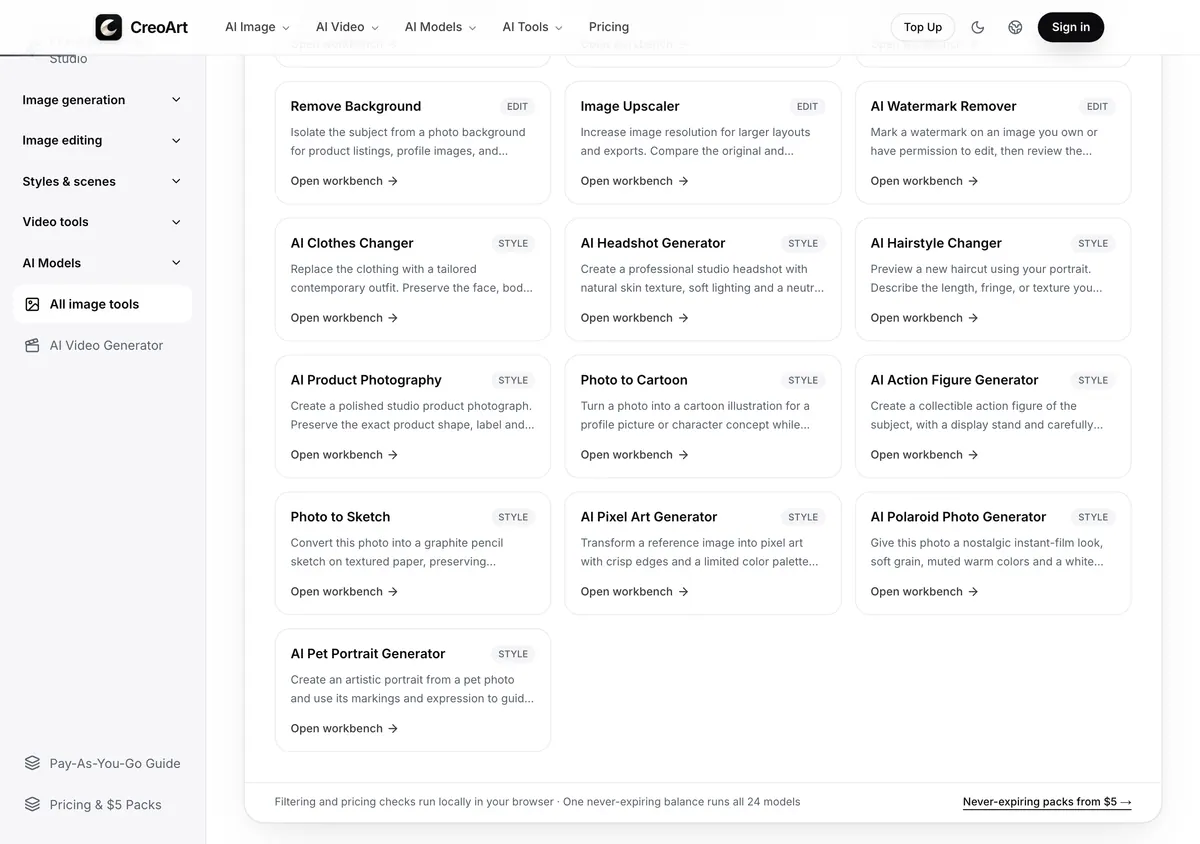
AI Clothes Changer
Replace the clothing with a tailored contemporary outfit. Preserve the face, body proportions, pose and scene lighting.
AI Headshot Generator
Create a professional studio headshot with natural skin texture, soft lighting and a neutral background. Preserve the identity.
AI Hairstyle Changer
Preview a new haircut using your portrait. Describe the length, fringe, or texture you want to try.
AI Product Photography
Create a polished studio product photograph. Preserve the exact product shape, label and colors with realistic lighting and shadows.
Photo to Cartoon
Turn a photo into a cartoon illustration for a profile picture or character concept while keeping the original pose and composition.
AI Action Figure Generator
Create a collectible action figure of the subject, with a display stand and carefully painted sculptural details.
Photo to Sketch
Convert this photo into a graphite pencil sketch on textured paper, preserving proportions, shading and key details.
AI Pixel Art Generator
Transform a reference image into pixel art with crisp edges and a limited color palette for sprites or retro illustrations.
AI Polaroid Photo Generator
Give this photo a nostalgic instant-film look, soft grain, muted warm colors and a white photo border.
AI Pet Portrait Generator
Create an artistic portrait from a pet photo and use its markings and expression to guide the result.
16 AI + Free PSD
Complete Suite · Product · Portrait · Cutout · Upscale · Mask Edit · Styles
Free – 12 credits
Clear Pricing · PSD Editor $0 · Cutout 8 cr · 4× Upscale 10 cr · Mask/Uncrop 12 cr
Local ↔ Cloud AI
Two-Way Handoff · Send local PSD layers into AI tools & return outputs to layers
Zero Public Feed
Local-First Privacy · Masks & PSD run in your browser · Private R2 · Instant /library delete
How to Chain Free Local Editing + Cloud AI Image Tools in 3 Steps
Skip juggling separate subscriptions for cutouts, upscaling, product shots, and Photoshop layers. Filter the live directory above to launch any purpose-built workbench.
- 1. Jump straight into a scenario workbench by categoryFilter by Generate, Edit & Fix, or Commercial & Styles locally in your browser. Each workbench loads tailored presets, aspect ratios, safe-zone overlays, and exact credit quotes immediately.
- 2. Pay only for the exact cloud GPU steps you runStage a product shot (7–10 cr), cut a clean transparent PNG (/background-remover, 8 cr), expand tight framing (/uncrop, 12 cr), or restore 4K crispness (/image-upscaler, 10 cr) from one never-expiring balance.
- 3. Finish typography, badges & color curves free in /photo-editorClick into our ad-free client-side WebGPU PSD & Layer Editor to add crisp marketing badges, adjust exposure curves, or export layered PSDs with zero uploads and zero credit cost.
Why Teams Are Replacing Five Fragmented Online Photo Subscriptions
A single e-commerce launch or creator rebrand traditionally meant stitching together four paid apps and three ad-heavy freebies: one subscription for background removal, another for 4× upscaling, a third for headshots or product staging, and bloated desktop software just to straighten a crop. Files lost quality at every download, recurring bills piled up, and free web tools exposed unreleased product photos.
CreoArt replaces the entire fragmented stack with one clean, zero-ad studio: handle crops, masks, color tweaks, and layered PSD typography locally for $0 in /photo-editor, and invoke cloud AI engines only when you need generative staging, pixel-sharp cutouts, or 4K upscaling at $0.07–$0.12 a pop.
Pain 1: Separate monthly subscriptions for cutouts, upscaling, headshots & staging
CreoArt fix: All 16 AI image tools share one $5 never-expiring credit wallet — zero monthly commitment.
Pain 2: Ad-riddled "free" tools locking HD exports behind 720p paywalls
CreoArt fix: Zero AdSense ads anywhere; /photo-editor exports full resolution free, and welcome/paid AI outputs deliver watermark-free up to 4K.
Pain 3: Re-rolling an entire AI render over one tiny flaw or missing headline
CreoArt fix: Patch localized glitches with /local-image-editor (12 cr) or layer pixel-perfect headlines free inside /photo-editor.
Pain 4: Leaking unreleased SKUs or personal portraits to public galleries
CreoArt fix: Local browser editing never uploads files; cloud AI jobs stay isolated in private Cloudflare R2 with instant /library delete.
4 Proven Multi-Tool Image Workflows & Exact Total Costs
Follow these battle-tested chains to deliver agency-grade visual sets for pennies per asset.
| Workflow Goal | Tool Chain on CreoArt | Total Credits (~USD) | Traditional Alternative |
|---|---|---|---|
| E-Commerce Hero SKU Pack | Product Photo → Cutout → 4× Upscale → Free PSD Text | 25–28 cr (~$0.26) | Studio shoot & retouching ($150+/SKU) |
| Executive Personal Brand | AI Headshot → Clothes / Hairstyle → Free Color Grade | 14–20 cr (~$0.17) | Portrait studio session ($120+) |
| Vertical to Banner Reframe | AI Uncrop → Local Brush Cleanup → Free Typography | 24 cr (~$0.24) | Reshoot or designer paint-over ($50+) |
| Indie Game Transparent Sprite | AI Pixel Art → Background Remover → Local Sheet | 12–16 cr (~$0.14) | Freelance sprite commission ($25+) |
CreoArt Image Tools Rate Card & Capabilities
Every tool publishes transparent upfront credits — claim 10 free welcome credits on sign-up to try your first run free.
| Image Tool | Category | Cost / Run | Best Feature |
|---|---|---|---|
| Free Browser PSD Editor | Local Free | 0 cr (Forever Free) | Client-side WebGPU Photoshop alternative, zero uploads |
| AI Product Photography | Commercial | 7–10 cr (~$0.08) | Travertine/marble studio scenes + strict label lock |
| AI Background Remover | Utility | 8 cr (~$0.08) | Hair-strand & glass Alpha PNG transparency cutouts |
| AI Image Upscaler (4×) | Utility | 10 cr (~$0.10) | Restore blurry photos & scale to 4K 300-DPI print |
| Local Brush Edit / Uncrop | Utility | 12 cr (~$0.12) | Browser-local mask painting or seamless ratio expansion |
| Headshot / Clothes / Hairstyle | Portrait | 7–10 cr (~$0.08) | Identity-locked career & lookbook transformations |
| Action Figure / Pet / Cartoon / Sketch / Pixel / Polaroid | Creative Styles | 4–10 cr (~$0.07) | 6 dedicated style workbenches with multi-ref & 4K support |
Local-First Architecture: Zero Upload for Edits, Private R2 for Cloud AI
CreoArt keeps work on your own device whenever possible: /photo-editor layers, /local-image-editor and /remove-watermark brush masks, resolution warnings, and platform safe-zone overlays all execute locally in your browser.
Cloud GPU calls store source and rendered images exclusively inside your private Cloudflare R2 vault (zero public gallery, zero self-model training, 30-day max retention, instant single-image delete in /library), with 100% automatic refunds on confirmed technical failures.
- Free /photo-editor executes 100% locally in WebGPU — zero server upload, zero ads.
- All 16 cloud AI image tools keep files strictly private with zero community showcase.
- 10 welcome credits free on sign-up; $5 never-expiring packs work across every single tool.
- One-click handoff into /image-to-video turns any polished still into a commercial video clip.
5 Practical Habits for Faster, Cheaper Pro Image Pipelines
Mix free local prep with targeted cloud AI steps to double approval speed.
1. Crop & straighten locally in /photo-editor before calling cloud AI
Spending 10 free seconds leveling horizons and removing clutter gives Uncrop, Product Photography, and Sketch conversion cleaner geometry on try one.
2. Isolate messy product shots with Background Remover first
If your phone shot has busy kitchen clutter behind a bottle, run /background-remover (8 cr) first so AI Product Photography preserves packaging edges cleanly.
3. Fix small flaws with Local Brush Edit instead of regenerating whole scenes
When 95% of a render is gold except one stray prop, paint over just that spot in /local-image-editor (12 cr) while keeping every other pixel untouched.
4. Ideate at 1K (7 cr), then upscale only winning frames 4× (10 cr)
Testing variations at 1K and upscaling your final 1–2 picks slashes 4K campaign costs by more than half.
5. Turn your winning hero still straight into a product video
Pass any finished studio shot or action figure into /image-to-video (from 35 cr) for smooth 360° turntable clips on product pages and Reels.
AI Image Tools Suite — Frequently Asked Questions
Answers on our 16 specialized AI image tools, free browser PSD editor, e-commerce chains, pricing, and privacy.
What AI image tools are included in CreoArt’s studio?
CreoArt combines 16 specialized AI image workbenches — including AI Product Photography, AI Headshot Generator, AI Clothes Changer, AI Hairstyle Changer, Background Remover (8 cr), 4× Image Upscaler (10 cr), Local Brush Image Editor (12 cr), AI Uncrop/Expand (12 cr), Owned-Asset Watermark Cleaner (12 cr), Image-to-Image, Action Figure, Pet Portrait, Cartoon, Sketch, Pixel Art, and Polaroid — plus our 100% free client-side WebGPU PSD & Layer Editor.
Do I have to pay separately for utility tools like background removal or upscaling?
No. Every single utility tool and generative workflow shares your exact same never-expiring credit balance: Background Remover is 8 cr (~$0.08), 4× Image Upscaler is 10 cr (~$0.10), Local Brush Edit / Uncrop / Watermark Cleanup are 12 cr (~$0.12), and generative tools start at 4–10 cr.
Is the CreoArt Browser Photo & PSD Editor really 100% free with no ads?
Yes. /photo-editor runs entirely locally inside your browser using WebGPU — zero uploads, zero ads, zero login required, and real PSD layer/mask support — with one-click handoff into any CreoArt AI tool whenever you need generative power.
How do CreoArt’s image tools chain together for an e-commerce store launch?
A complete Amazon/Shopify SKU costs roughly 25–30 credits (~$0.25–$0.30): stage a phone snapshot in /tools/ai-product-photography (7–10 cr), isolate a pure white or transparent hero via /background-remover (8 cr), fix a tiny glare spot in /local-image-editor (12 cr), and export print-ready posters via /image-upscaler (10 cr).
Can I test image tools before spending any money?
Yes. Run up to 3 free daily FLUX.2 Klein 4B images with zero login, use /photo-editor unlimited for free, and claim 10 free welcome credits on sign-up to run your first watermark-free product shot, headshot, cutout, or upscale.
Which image tools support up to 14–16 reference images for brand consistency?
Our flagship commercial workbenches (/tools/ai-product-photography, /image-to-image, /ai-image-generator, /tools/ai-action-figure-generator, /tools/ai-pixel-art-generator) let you attach extra reference images powered by GPT Image 2.5 (16 refs), Nano Banana 2.1 (14 refs), and Seedream 5.0 Lite (14 refs).
Do CreoArt image tools preserve original product labels and human faces?
Yes. Every commercial and portrait workbench ships with dedicated Fidelity / Likeness Lock directives and real interactive Before/After sliders so you verify label accuracy and natural facial likeness immediately.
Are uploaded client products and personal portraits kept private?
Yes. Canvas masking, pixel inspections, and /photo-editor layers run strictly locally in your browser. Cloud AI inputs and outputs live exclusively in private Cloudflare R2 storage (zero public gallery, zero self-model training, 30-day max retention, instant delete in /library).
Explore All 44 Models, Video Tools & Ready-to-Use Templates
Your single never-expiring balance spans every image tool, model studio, and video workbench.
Free Online PSD Editor
Ad-free WebGPU browser layers with AI handoff
AI Product Photography
Commercial studio staging with strict label fidelity
AI Background Remover (8 cr)
Crisp transparent PNGs for products & hair
AI Image Upscaler (10 cr)
4× print-ready clarity up to 4K resolution
AI Video Tools Hub
Animate polished stills into commercial video clips
Prompt Templates Gallery
Launch proven commercial & creative presets in one click