
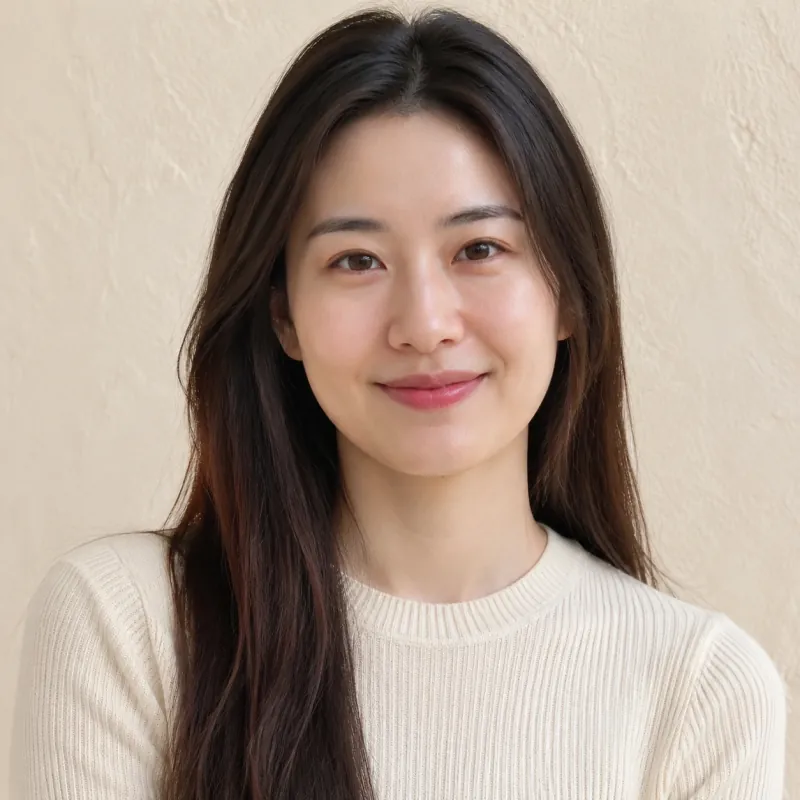
 Before
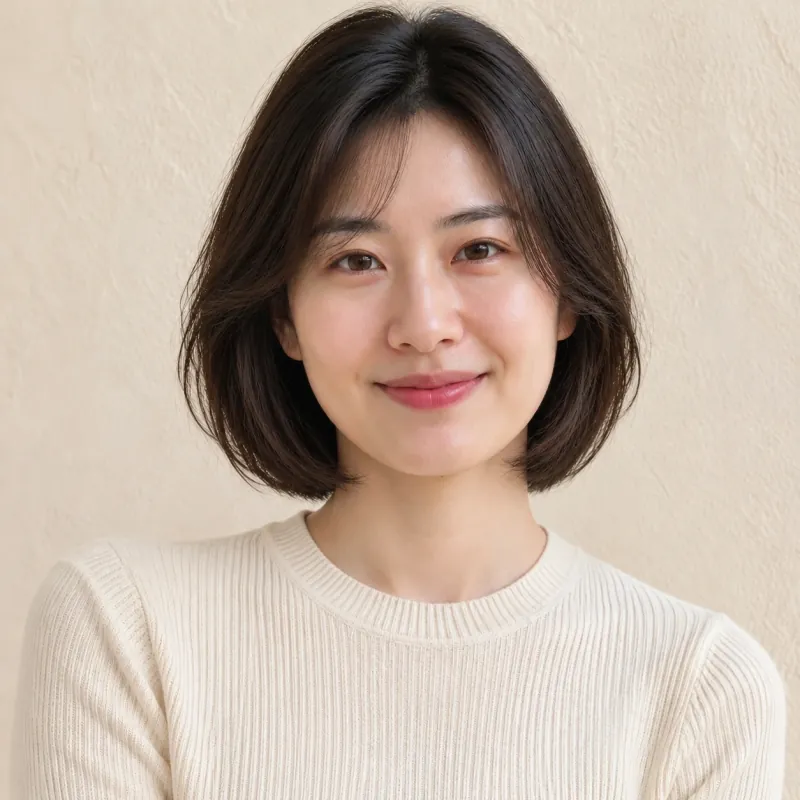 After
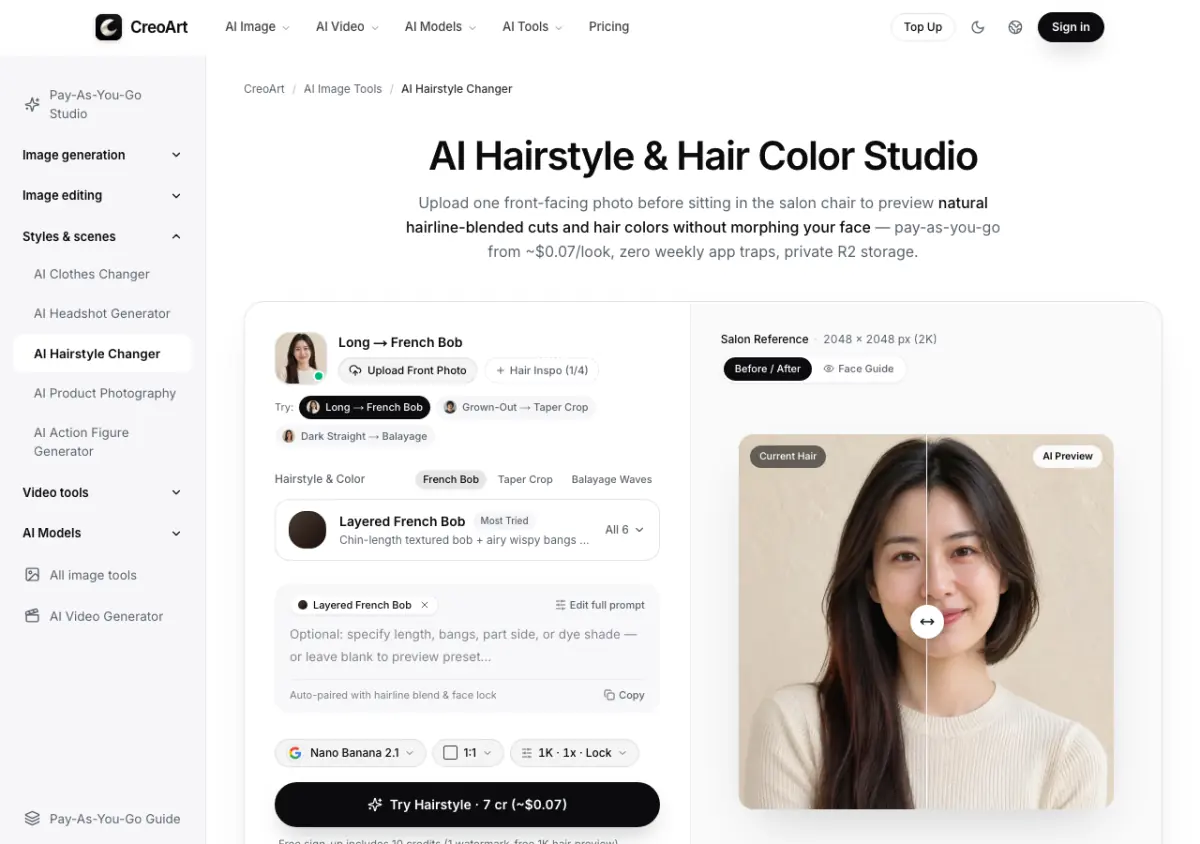
Long → French Bob
Chin-length layered French bob with airy wispy bangs; face, top & wall untouched
Upload one front-facing photo before sitting in the salon chair to preview natural hairline-blended cuts and hair colors without morphing your face — pay-as-you-go from ~$0.07/look, zero weekly app traps, private R2 storage.
Face-alignment guides & resolution checks run in your browser; Generate uploads privately to per-account R2 (zero public gallery, zero training, instant delete in /library).
Auto 100% refund on failed runs~$0.07 / Look
Test 10 cuts & colors for under $1 before booking
Hair Inspo Ref
Upload any salon screenshot to try that exact cut
Face-Shape Guide
Preview hairline & chin alignment locally in browser
No Weekly App Trap
Browser native, zero auto-renew, private R2 vault
Walking into a salon with vague descriptions like "a little layered framing" or gambling $240 on balayage without seeing how it suits your undertone is stressful. Follow four quick steps above and bring a sharp 2K reference of yourself straight to your stylist:
Most mobile hairstyle try-on apps follow the same frustrating playbook: first they funnel you into a $7.99/week auto-renewing subscription, then they paste a stiff template wig on top of your head with fuzzy halo edges, disappearing ears, and a subtle beauty filter that slims your cheeks and changes your nose. Falling in love with a preview where the app secretly reshaped your face only leads to salon regret.
Two technical flaws drive that uncanny wig look. First, basic segmentation overlays paste stock hair cutouts over your head without recalculating forehead shadows, baby-hair hairline transitions, or background lighting spill—leaving an obvious sticker seam. Second, consumer filter apps mix facial beautification into their hair-editing weights, altering the exact facial proportions you are trying to match a haircut to.
CreoArt treats hairstyle try-on as an honest pre-salon decision tool. Our Strict Face, Makeup & Backdrop Lock protects your real face shape, eyebrows, ear placement, attire, and background while flagship models—Nano Banana 2.1 (up to 14 refs, crisp strand-level hairlines) and Seedream 5.0 Pro (glossy natural dye gradients and springy curls)—re-render only the hair. With pay-as-you-go credits starting at $5 (never expiring) and zero weekly subscription traps, you can test every cut honestly for pennies.
App secretly slims your jaw or smooths your face during hair swaps
Keep Strict Face, Makeup & Backdrop Lock toggled on so the Before/After slider proves only your hairstyle changed—giving you a truthful salon preview.
Hairline looks stiff or shows a blurry wig seam against the wall
Start with an evenly lit daylight portrait with hair pulled gently away from the forehead and select Nano Banana 2.1 for natural fine-strand integration.
Warm bathroom lighting skews blonde, copper, or ash-brown hair colors
Use a neutral window-lit native camera selfie with Seedream 5.0 Pro so you can accurately judge whether warm caramel or cool espresso flatters your undertone.
Testing short bobs from very long hair distorts covered shoulders
Tie long hair loosely into a low ponytail behind your neck before taking your source photo—exposing your real collar and neckline makes short-cut previews dramatically cleaner.
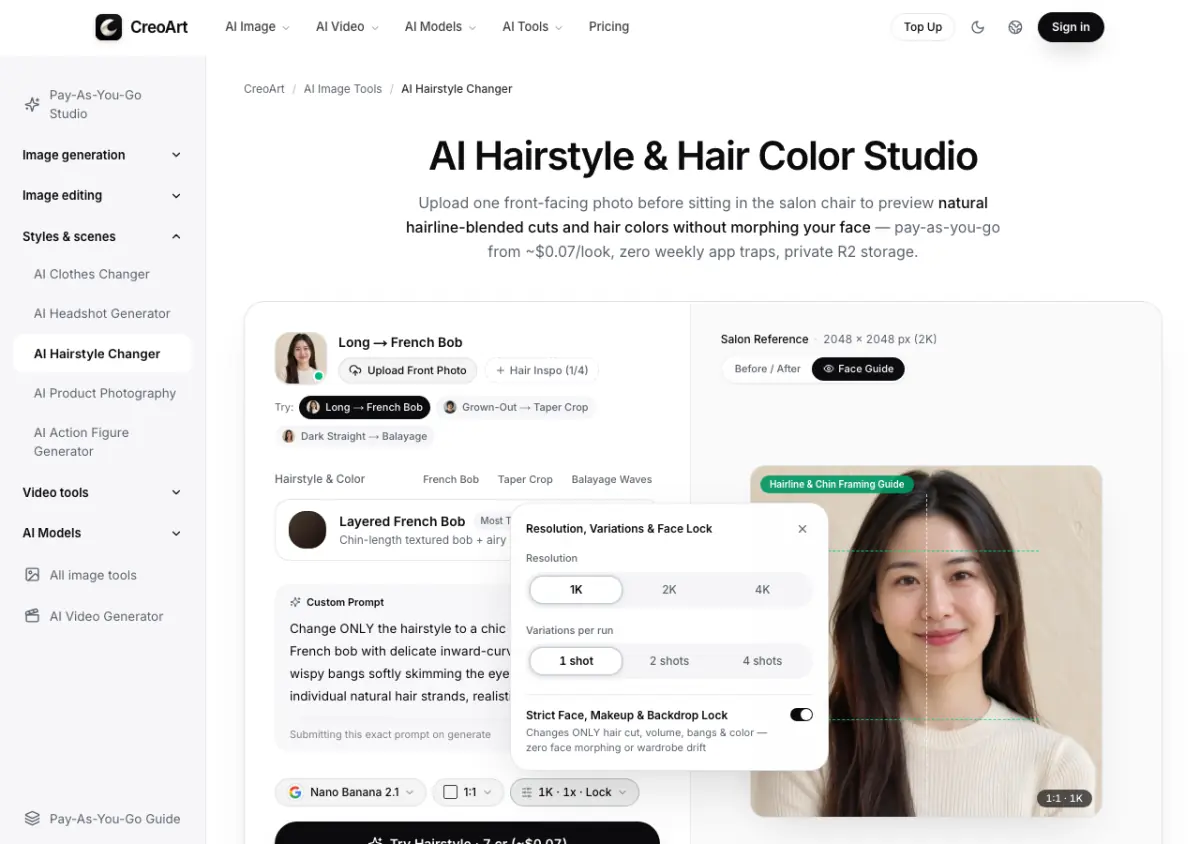
Unsure whether a chin-length French bob, textured wolf cut, or curtain bangs will balance your proportions? Toggle the Face Guide in the workbench and use this quick stylist matrix:
| Face Shape | Styling Objective | Best Presets to Test First | Cuts to Preview Carefully | Prompt Tuning Cue |
|---|---|---|---|---|
| Round Face | Add vertical crown lift & elongate lower jawline | Soft Layered Wolf Cut / Curtain Bangs & Balayage / Sleek Lob | Heavy blunt full bangs or rounded chin-cupping bobs | "Lifted root volume + cheekbone-grazing curtain layers" |
| Square / Strong Jaw | Soften angular jawline with movement & subtle waves | Curtain Bangs & Balayage / Defined Soft Curls / French Bob | Pin-straight jaw-level blunt cuts without texture | "Feathered ends below jaw + soft off-center wave flow" |
| Long / High Forehead | Shorten upper-third height & add soft horizontal width | Layered French Bob / Defined Soft Curls | Ultra-long flat center-part straight hair | "Airy wispy eyebrow-skimming bangs + temple-level bounce" |
| Diamond / High Cheekbones | Fill temple balance & soften widest cheekbone line | Curtain Bangs & Balayage / Soft Layered Wolf Cut | Slicked-back flat crowns with zero side framing | "Tapered temple fringe + collarbone wispy ends" |
| Oval / Balanced Thirds | Versatile across lengths; focus on healthy shine & personal vibe | All 6 presets (Glass-Hair Lob & French Bob shine brightest) | Focus on matching dye undertone rather than length limits | "Precision razor ends + glossy daylight strand separation" |
| Men’s Cuts (Square / Round / Oval) | Keep temples tight while sculpting matte top proportion | Textured Low-Taper Crop (customize fade height or curtain flow) | Puffy unblended sides or flat helmet fringe | "Clean low-taper fade around ears + matte piecey crown" |
Most people only want to screen 5 to 15 hair ideas before booking an appointment—not pay $7.99 every week to a subscription app they forget to cancel. Here is the real breakdown on CreoArt’s $5 never-expiring Entry Pack (500 credits, $0.01/credit):
Screen styles fast at 1K, then save your top pick at 2K for your stylist
CreoArt Pay-As-You-Go
~$0.56
56 credits · $5 Entry Pack (500 never-expiring cr — 444 left)
Avg Salon Cut + Color Mistake
$240+
Verify bangs & color tone for under $1 before the scissors touch your hair
Mobile Hair App ($7.99/wk auto-renew)
$415/yr
Zero auto-renewal on CreoArt — browser native, packs never expire
| Model / Option | Default Spec & Credits | Approx. USD ($5 Pack) | Looks per $5 Pack | Best Hairstyle & Color Fit |
|---|---|---|---|---|
| Nano Banana 2.1 (Recommended Default) | 1K · 7 cr (2K 11 cr / up to 4K & 14 refs) | ~$0.07 / look | ~71 hair previews | All-round haircut try-on: sharpest hairline blend, zero face drift, great with salon inspo refs |
| Seedream 5.0 Pro | 1K · 10 cr (2K 20 cr / up to 10 refs) | ~$0.10 / look | ~50 hair previews | Color & texture specialist: luminous caramel balayage melts, copper tones, and realistic curls |
| GPT Image 2.5 | 1K Low 4 cr · Med 8 cr · High 24 cr (16 refs) | ~$0.04–$0.24 / look | 20–125 hair previews | Precision prompt compliance for split-dye placement, micro-bangs, and exact inspo transfers |
| Mobile Hair Apps ($7.99/wk) | $7.99–$9.99 / week auto-renew (~$415/yr) | Recurring trap | Often watermarked | One week of an auto-renewing phone app pays for over 100 high-res CreoArt previews |
| Blind Salon Cut + Color Fix | $180–$350+ plus months of grow-out | High regret risk | Irreversible | Spend under $1 confirming bangs and color tone first, then hand your stylist a 2K target photo |
See how long straight hair shifts into a French bob, overgrown hair tightens into a low-taper crop, and dark straight hair transforms into caramel balayage waves while faces, tops, and backdrops stay untouched:
BeforeAfterChin-length layered French bob with airy wispy bangs; face, top & wall untouched
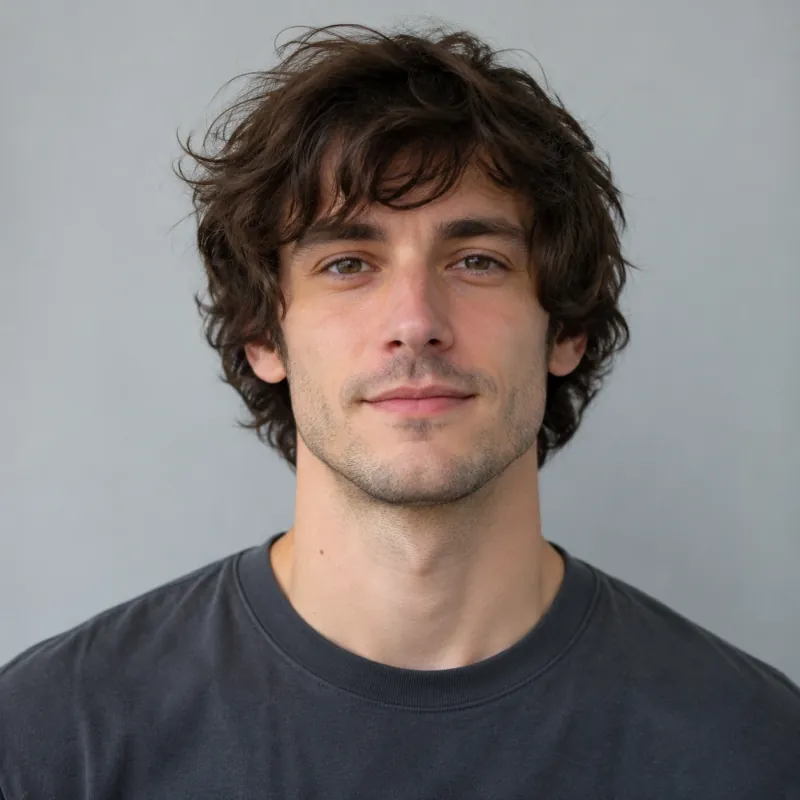 Before
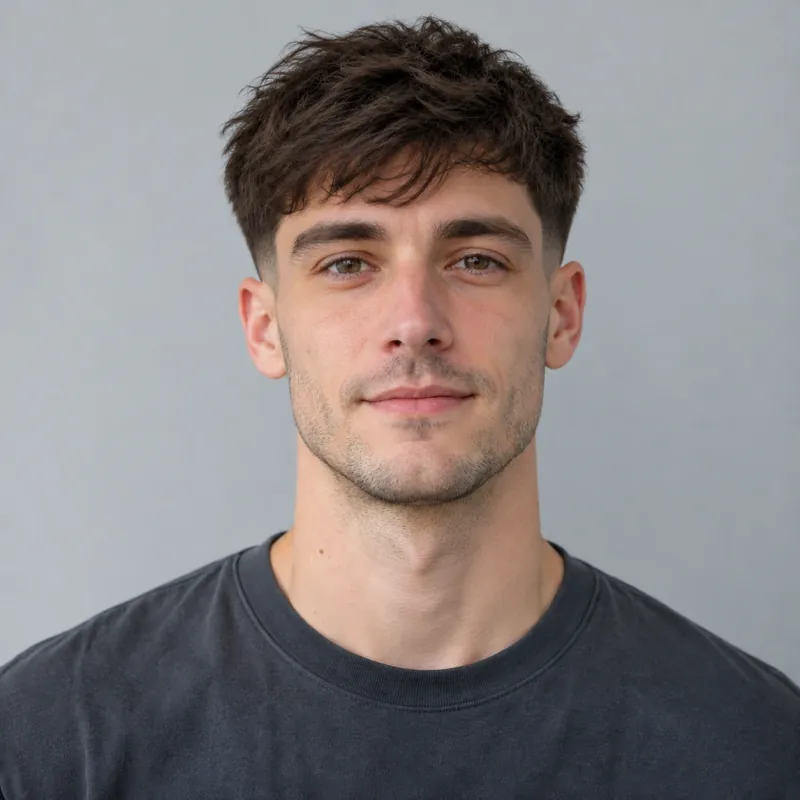 After
Clean low-taper side fade with matte piecey top volume and natural hairline blend
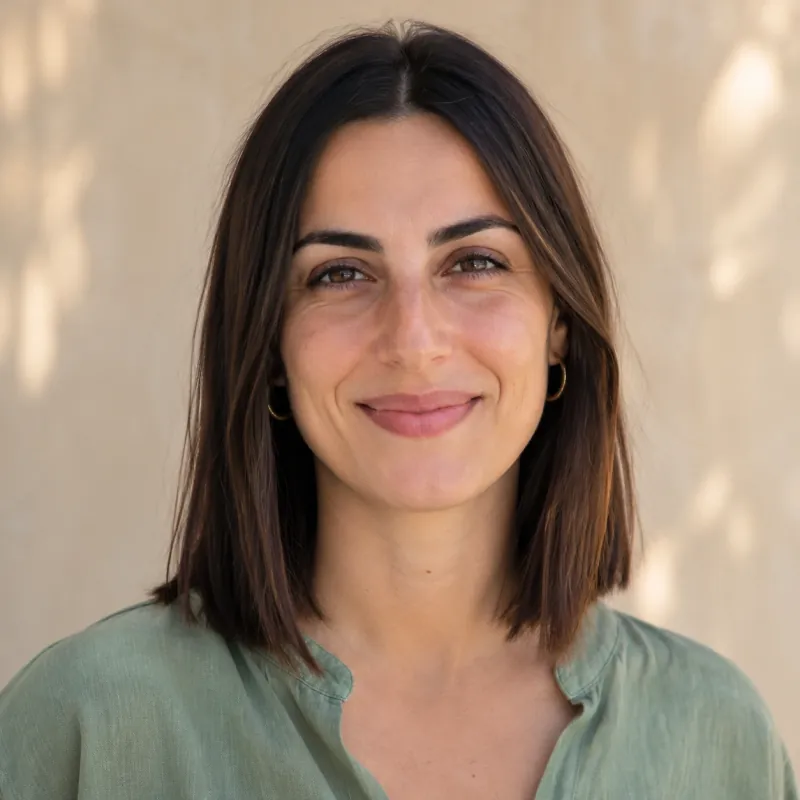 Before
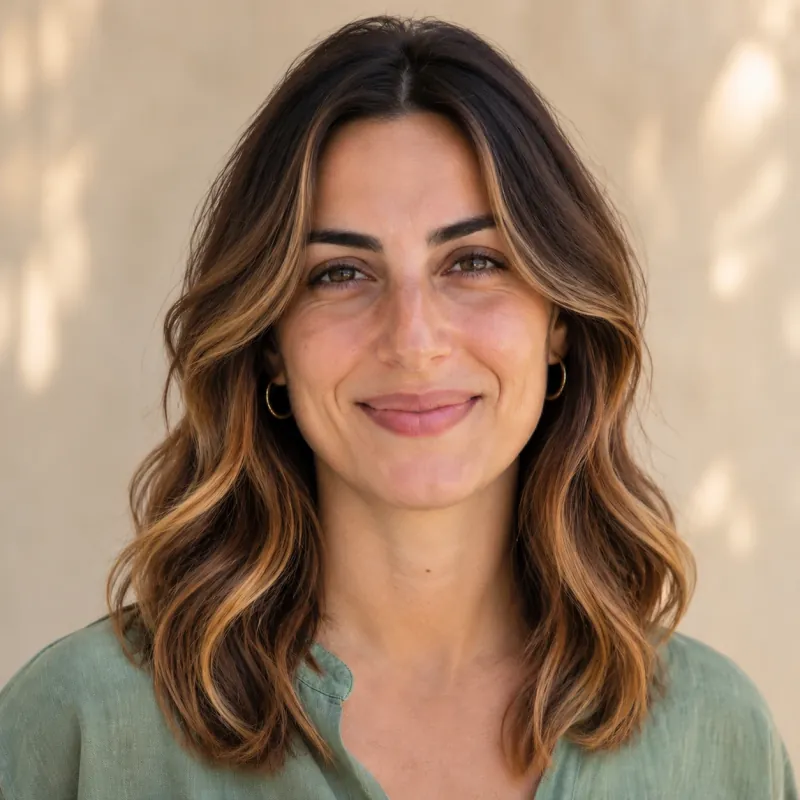 After
Face-framing curtain bangs + dimensional honey-caramel balayage waves from dark roots
Trying on hairstyles requires uploading a clear, unobstructed photo of your face. Too many free browser tools and mobile apps quietly retain customer portraits for internal dataset training or showcase user transformations on public gallery walls.
CreoArt (operated by CreoArt Studio / MagicT LLC) operates with zero public community gallery. Resolution checks and face-alignment guides run locally in your browser; when you generate a preview, your portrait, inspiration screenshots, and previews live exclusively inside private per-account Cloudflare R2 storage (Cache-Control: private, no-store).
Getting a salon preview so realistic you can show it straight to your stylist takes 20 seconds of source-photo prep:
When long hair covers your collarbone and shoulders, switching to a chin-length bob forces the AI to reconstruct hidden clothing underneath. Pulling your hair loosely behind your ears reveals your true neckline for remarkably clean short-hair previews.
Yellow bathroom bulbs distort cool ash browns and honey blondes. Stand facing a window in natural daytime light so you can trust how caramel balayage, copper, or espresso shades interact with your real skin tone.
Cropping tightly against the crown leaves no canvas for lifted roots, curtain volume, or bouncy curls. Step back slightly so both shoulders and ample space above your hair remain comfortably inside the frame.
Words like "textured bob" mean five different things to five different people. Attach a clear inspiration photo in Hair Inspo and note any tweak ("same cut, keep my natural dark brown roots") for pin-sharp alignment.
Compare 6 to 8 cuts at 1K (7–10 credits each) to narrow down your favorite silhouette, then render your top pick at 2K so your barber or colorist can clearly inspect bang taper, face framing, and highlight placement.
Answers on face-shape matching, custom hair color references, privacy, and per-preview pricing.
On the $5 never-expiring Entry Pack (500 credits, $0.01/credit), a 1K hairstyle preview costs 7 credits (~$0.07) on Nano Banana 2.1 or 10 credits (~$0.10) on Seedream 5.0 Pro. You can test 10 cuts and hair colors for under $1 with zero weekly auto-renewing app subscription.
Yes. Upload your front-facing daylight photo as the main image, then click Hair Inspo to attach 1 to 3 reference screenshots of the haircut or balayage shade you love. Our multi-reference workflow transfers that exact silhouette and bang framing onto your head.
No when Strict Face, Makeup & Backdrop Lock is kept enabled. It explicitly constrains the model to modify only hair length, volume, bangs, hairline, and dye tone—giving you an honest preview you can trust before booking a salon chair.
Tie your long hair loosely back into a low ponytail behind your ears before taking your front-facing photo. Exposing your real collarbone and shirt neckline lets the AI render chin-length bobs and pixie layers cleanly without inventing covered clothing.
Yes. Select the Textured Low-Taper Crop preset or write exact barber terminology (such as mid skin fade, French crop, side-part taper, or medium curtain flow) in the Custom Prompt box to test cuts cleanly.
Yes. Switch to Custom Prompt (or add a note in Preset Assist) specifying "keep my exact current haircut length and shape, change ONLY hair color to..." and pick Seedream 5.0 Pro (10 cr) for realistic root melts and natural daylight shine.
Yes. Face-alignment guides run locally in your browser; when you generate, portraits and hair previews stay isolated in private per-account Cloudflare R2 storage (Cache-Control: private, no-store) with zero public gallery, zero face training, 30-day auto-cleanup, and instant 1-click delete in /library.
Screen 5 to 8 candidate cuts quickly at 1K (7 cr / ~$0.07 each) to eliminate shapes that clash with your jawline, then generate your top 1–2 finalists at 2K (11–20 cr) so your stylist can clearly read bang taper, side layers, and highlight placement.
Use the same never-expiring credit wallet to pair your new hairstyle with studio headshots, outfit changes, or precision touch-ups:
Pair your refreshed look with 85mm corporate LinkedIn and founder studio headshots.
Test blazers, knitwear, and resort outfits that complement your new cut and hair color.
Love the overall cut but want slightly shorter bangs or softer side layers? Paint only that area.
Build a side-by-side 4-up hairstyle poll collage for friends or adjust color balance locally.