Every image and video below was generated live in CreoArt Studio—not stock placeholders—with the exact model, reproducible prompt, credit & USD cost, and measured end-to-end latency.
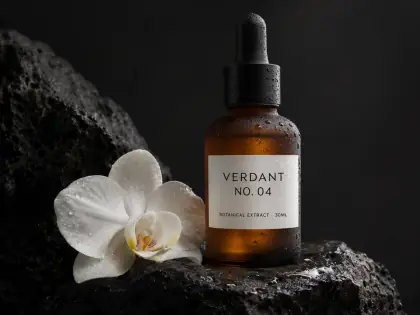
Frosted amber glass dropper bottle on wet volcanic basalt with razor-sharp printed label typography ("VERDANT NO. 04 / BOTANICAL EXTRACT · 30ML") and directional rim light.
Credits
35 credits
Spec
4:3 · 1K · high
Measured time
32s run
Reproducible PromptToggle
Luxury botanical facial serum in a frosted amber glass dropper bottle resting on wet dark volcanic basalt stone beside a single fresh white phalaenopsis orchid. Crisp minimalist white label printed cleanly with sharp black typography reading "VERDANT NO. 04" and smaller line "BOTANICAL EXTRACT · 30ML". Soft directional studio rim lighting, realistic condensation droplets on glass, deep charcoal shadow background, high-end beauty editorial photography shot on Hasselblad medium format.
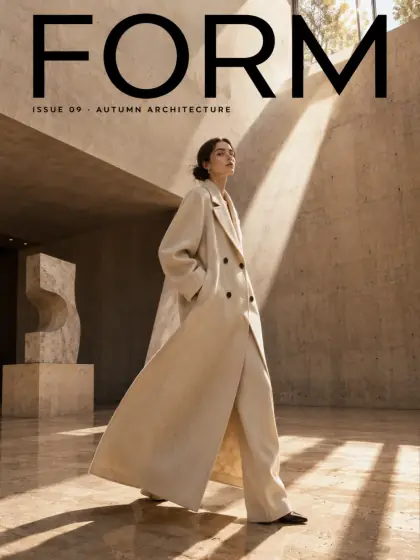
Sunlit concrete museum atrium with diagonal golden light shafts, tailored ivory wool coat in motion, and clean Swiss magazine masthead ("FORM / ISSUE 09").
Credits
35 credits
Spec
3:4 · 1K · high
Measured time
34s run
Reproducible PromptToggle
Minimalist sunlit brutalist concrete museum atrium with dramatic diagonal afternoon sunbeams and warm travertine shadows. A poised editorial model wearing a sculptural ivory double-breasted wool overcoat stands mid-stride in the light shaft. Clean ultra-sharp Swiss black sans-serif magazine masthead typography at the top reading "FORM" and subtle metadata below reading "ISSUE 09 · AUTUMN ARCHITECTURE". Crisp medium-format film grain, gallery editorial lighting.
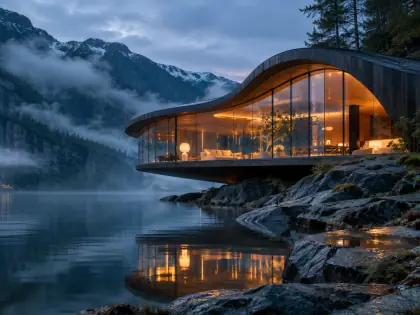
Cantilevered biomorphic cedar-and-glass pavilion glowing warm amber over a misty glacial fjord at blue hour, with mirror-calm water reflections.
Credits
35 credits
Spec
4:3 · 1K · high
Measured time
31s run
Reproducible PromptToggle
Biomorphic curved glass and charred cedar conservatory cantilevered over a misty Norwegian alpine fjord at blue hour twilight. Warm golden amber interior lights glow through floor-to-ceiling glass, casting serene mirror reflections onto still glacial water and wet slate boulders below. Crisp mist drifting along pine peaks, architectural cinema still photographed on 35mm medium format.
How to Try Free & Unlock Watermark-Free Exports
Every visitor gets a real free path before spending a dollar — no hidden paywall.
Path 1 · Zero-Login Daily Trial
FLUX.2 Klein 4B — 3 Free 1K Images Daily
Generate up to 3 square 1K images per UTC day right in your browser (includes a small CreoArt mark) with no account or credit card required.
Free accounts receive 10 watermark-free welcome credits to test flagship models right away. Need more volume? Top up anytime with never-expiring pay-as-you-go packs from $5 or custom $5–$500 top-ups (zero auto-renewal).
The creation panel shows the settings available for your selected model and input. Review the credit quote before submitting.
How to use GPT Image 2.6 Flare AI Generator
1
Choose a model and direction
Compare compatible inputs and output settings before starting your draft.
2
Describe the result
Add a clear prompt and reference material when the selected model supports it.
3
Review before sharing
Inspect completed outputs and download the version that fits your project.
More ways to create with GPT Image 2.6 Flare AI Generator
OpenAI GPT Image 2.6 Flare capabilities
Next-gen OpenAI image generation and 16-reference editing up to 4K with 5 quality tiers.
Supported ratios, resolutions & reference inputs
Available ratios: auto, 1:1, 3:2, 2:3, 4:3, 3:4, 5:4, 4:5, 16:9, 9:16, 2:1, 1:2, 3:1, 1:3, 21:9, 9:21; resolutions: 1K, 2K, 4K; up to 16 reference images. Every run shows its exact credit quote upfront.
Compare alongside 47 image & video models in one studio
Run the exact same prompt across peer models using one shared credit balance — with watermark-free credit exports and automatic credit refunds on confirmed failed jobs.
Visual ideas to explore
These examples illustrate possible creative directions. Results vary with your input and settings.
Answers about source files, model settings, credits, task history and responsible use.
What is GPT Image 2.6 Flare?
GPT Image 2.6 Flare is a OpenAI AI image model available directly in CreoArt. Next-gen OpenAI image generation and 16-reference editing up to 4K with 5 quality tiers. Select it in the studio to view supported controls and an upfront credit quote.
How do I start using GPT Image 2.6 Flare?
Enter a descriptive prompt, pick your preferred AI model, aspect ratio, and resolution, check the upfront quote, and click Generate.
How can I try GPT Image 2.6 Flare in CreoArt?
Create a free account to claim 10 welcome credits, or choose a subscription or one-time credit pack on /pricing to run GPT Image 2.6 Flare without watermarks.
Which file formats does GPT Image 2.6 Flare accept?
Image workflows accept standard JPG, PNG, and WebP files up to 20MB. Uploaded previews stay private to your browser until you submit a task.
How should I write prompts for the best GPT Image 2.6 Flare results?
Be specific about subject details, lighting, camera angle, and texture—and when editing a reference photo, explicitly mention which features must remain unchanged.
Which aspect ratios and resolutions does GPT Image 2.6 Flare support?
Credit cost depends on the selected model, output resolution, quality tier, batch count, or video clip duration. The exact credit quote is always shown upfront before you submit.
Do generated outputs include a watermark?
Only Free Queue generations carry a CreoArt watermark. Every image or video generated with credits or Subscriber Unlimited Slow downloads cleanly with no added CreoArt watermark.
Which output resolutions are supported?
Supported image models offer 1K, 2K, and native 4K output depending on the selected model, plus 2× and 4× enhancement in the Image Upscaler.
Which aspect ratios can I choose?
Common ratios include 1:1 square, 16:9 widescreen, 9:16 vertical reel/story, 4:3, 3:4, 3:2, 2:3, and 21:9 cinema—with ultra-wide banner ratios available on Nano Banana 2.1.
How long does generation usually take?
Fast image models finish in a few seconds, while 4K multi-reference renders take slightly longer. Tasks continue processing safely in the cloud queue.
What happens if a generation fails technically?
Confirmed technical failures are automatically refunded. Whenever an upstream model reports a confirmed failure, CreoArt releases your reserved credits right back to your account balance.
Where are my completed creations stored?
Signed-in tasks are stored privately in My Creations (/library) for 30 days so you can revisit prompts and download originals. Download key files locally for permanent archival.
Can I use outputs for commercial work?
Paid subscribers and credit-pack buyers may use watermark-free outputs in commercial marketing, e-commerce, social videos, and client deliverables subject to model terms and rights in your uploaded inputs.
Are my uploaded reference images kept private?
Your uploaded references and private generations are tied strictly to your account via authenticated storage links and are never shared in a public community gallery.
Which other CreoArt tools pair well with this workflow?
Combine Image to Image for style transfers, Local Image Editor for brush-mask fixes, Background Remover for transparent PNGs, and Image to Video to animate your final shot.

 Verified Output